
Getting Started: Hardware Identity Privacy Fundamentals
NOTE
This page is the map for the whole project: what an HWID is, which parts expose identity, the order of work, and how to prove a change. The page itself changes no identifier. The linked part guides do that. Risk lives in the part guides: firmware and device writes can brick hardware or void warranties. This project covers privacy research, inventory validation, and education. It does not promise anonymity or unlinkability. A changed value in one tool proves only that the displayed value changed.
Hardware identity is not one number. A Windows PC exposes a collection of identifiers from component firmware, platform firmware, the operating system, file systems, drivers, and the local network. Privacy research starts by measuring those layers separately. A
How to read these guides
Every guide states what a change does, what it bypasses, who reads the identifier, and how to verify the result.
Evidence grades appear inline next to claims:
- C confirmed first hand by a named user with hardware and procedure details.
- A verified against a cited specification, vendor document, Microsoft document, or repository source.
- CC supported by multiple independent community reports.
- S a single claim or a procedure that has not been independently verified.
Each procedure carries a status line naming who tested it. Risk boxes mark permanent or destructive operations. Treat anything graded S as a research lead, not a procedure.
Table of Contents
- What an HWID is
- Identifier groups
- Persistent and software-level identifiers
- Plan the work in the right order
- Device restrictions
- Safety checklist
- Take before and after snapshots
- Keep changed values plausible
- Clean Windows reinstall checklist
- Known-spoofable hardware
- Reported anti-cheat status
- Sources
What an HWID is
HWID is shorthand for the set of values that software can use to describe or correlate a computer. There is no single universal HWID shared by every application. One program may use the SMBIOS system UUID and disk serial. Another may add a TPM endorsement identity, NIC MAC address, monitor EDID, USB serials, or Windows registry values. A
The main layers are:
- Platform firmware: SMBIOS system, baseboard, firmware, and chassis data. DMTF defines separate SMBIOS structures for system information, baseboard information, and chassis information. A DMTF SMBIOS 3.10.0
- Device firmware: Storage serials and namespace IDs, a NIC's permanent MAC, RAM SPD data, monitor EDID, GPU firmware data, and USB device serial strings.
- Security hardware: TPM keys and certificates. A TPM endorsement public key, its hash, an EK certificate, the certificate serial, and an attestation key are different values. A TCG EK Credential Profile
- Windows state: The registry value commonly called MachineGuid, hardware-profile GUID, Windows Product ID, product key when firmware exposes one, install date, PnP device instances, and driver configuration.
- File-system state: GPT and partition identifiers plus volume serial numbers. A volume serial is not the manufacturer's disk serial. A Microsoft GetVolumeInformationW
- Network state: Current MAC addresses, software MAC overrides, Bluetooth radio addresses, and dynamic ARP entries that map nearby IP addresses to link-layer addresses.
Windows uses hardware IDs and device instance IDs to enumerate devices and select drivers. A device instance can include a serial supplied by the bus or device. A Microsoft hardware IDs, Microsoft device instance IDs
HWIDChecker reads MachineGuid from HKLM\SOFTWARE\Microsoft\Cryptography. A A Microsoft-hosted Q&A answer describes it as generated during Windows installation, but Microsoft does not document it there as a hardware serial or a privacy boundary. Treat it as installation state, not as a guaranteed unique or stable hardware identifier. S Microsoft Q&A: choosing a machine identifier
CAUTION
Do not treat a blank, zero, placeholder, or changed field as proof that the computer has a new identity. Other interfaces may still expose the original component, and a remote service may combine hardware values with accounts, network data, or behavior.
Identifier groups
The repository-root HWIDChecker.exe is an inspector. It does not spoof identifiers. Its current source runs 15 providers in parallel and keeps this display order. A Rust provider table
| HWIDChecker section | What it displays | Main layer |
|---|---|---|
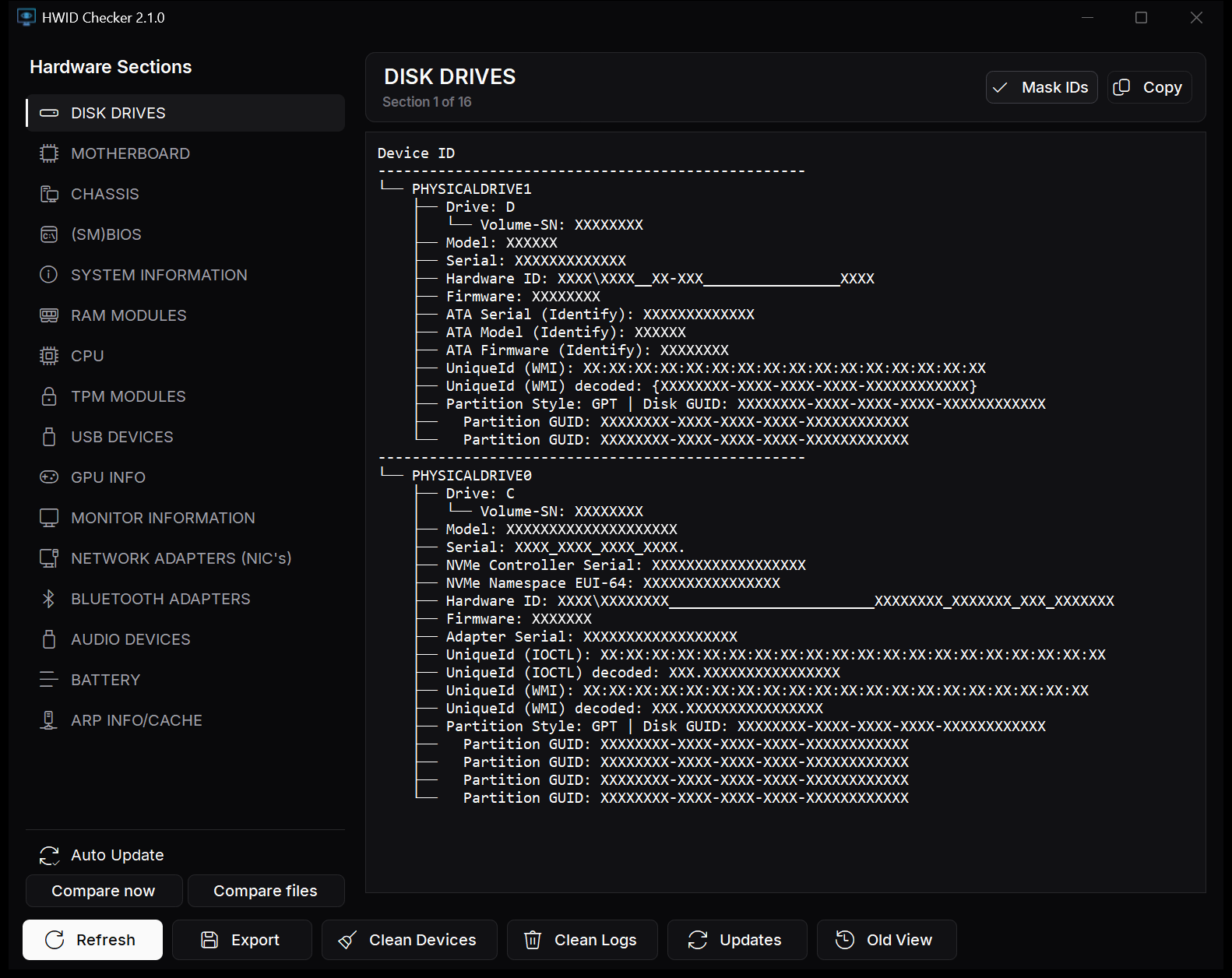
| DISK DRIVES | Physical model and serial, firmware, hardware ID, storage UniqueId values, partition identity, drive letter, and volume serial | Device firmware, storage stack, file system |
| MOTHERBOARD | SMBIOS Type 2 manufacturer, product, version, serial, asset tag, and location, with WMI fallback | Platform firmware |
| CHASSIS | SMBIOS Type 3 manufacturer, type, version, chassis serial, and asset tag | Platform firmware |
| (SM)BIOS | BIOS vendor/version/date plus SMBIOS system UUID, identifying number, system serial, SKU, and family | Platform firmware |
| SYSTEM INFORMATION | Windows Product ID, firmware product key when exposed, MachineGuid, hardware-profile GUID, and install date | Windows and registry state |
| RAM MODULES | Slot, manufacturer, part number, capacity, and serial reported through Win32_PhysicalMemory | SPD/SMBIOS view |
| CPU | Processor name, processor ID, any exposed serial, CPUID vendor, family, model, and stepping | Processor and OS view |
| TPM MODULES | State, manufacturer, firmware/specification versions, EK public-key hash, and parsed certificate serial, thumbprint, and issuer when available | Security hardware |
| USB DEVICES | USB PnP device name and serial parsed from the device instance | Device firmware and PnP |
| GPU INFO | GPU name, PnP/hardware ID, NVIDIA UUID, board serial, and supported NVML details when available | Device firmware and PnP |
| MONITOR INFORMATION | EDID manufacturer, model, product code, text and numeric serials, and manufacture week/year | Monitor EDID |
| NETWORK ADAPTERS (NIC's) | Product/device/hardware IDs, current MAC, permanent MAC through the native interface table when available, and NDIS OID corroboration. Registry override detection is a fallback when the native permanent address is unavailable | NIC firmware, driver, registry |
| BLUETOOTH ADAPTERS | Adapter name and local radio address when Windows exposes it | Radio and registry state |
| BATTERY | Battery interface identity, model, serial, unique ID, and SMBIOS battery records when exposed | Battery firmware and SMBIOS |
| ARP INFO/CACHE | IPv4 and IPv6 neighbor entries grouped by interface. The arp.exe fallback is IPv4-only | Local network runtime |
Microsoft documents the underlying Windows views for baseboards, physical memory, monitor IDs, and TPM state. A
NOTE
The 15 sections are not a complete inventory of every interface. The NIC provider filters on WMI's Ethernet 802.3 adapter type and can omit other adapters. USB identity includes device-instance parsing and native descriptor queries where supported. Monitor EDID enrichment matches the exact device instance; unsupported or ambiguous data is recorded in diagnostics rather than borrowed from another monitor. See the collection contracts and limits. A
Keyboards, mice, headsets, docks, webcams, and adapters can contribute USB identity data. Baseline them like any other peripheral. A device missing from USB DEVICES is not proof that it has no serial because the current parser intentionally skips several device-instance patterns. A
Persistent and software-level identifiers
Persistence describes where a value lives. It does not describe who can see it or whether it is globally unique.
| Layer | Examples | What a reboot or Windows reinstall normally does |
|---|---|---|
| Component firmware | SSD serial, NIC permanent MAC, USB serial, SPD serial, EDID serial | Usually unchanged. Formatting or reinstalling Windows does not rewrite component firmware. |
| SMBIOS platform data | System UUID, baseboard serial, chassis serial | Usually unchanged by a Windows reinstall. Firmware service, an OEM tool, or hardware replacement can change it. |
| UEFI variable store | Boot####, BootOrder, security databases, and vendor variables | Firmware and operating-system setup can create or update variables. A changed variable is not automatically a hardware-identity change. See the NVRAM guide. A |
| TPM protected state | Endorsement seed-derived keys, EK public key, EK certificate | A Windows reinstall does not by itself establish a new endorsement identity. A standard TPM clear resets state but must not be assumed to replace the endorsement seed. A TCG TPM 2.0 Architecture |
| Windows registry and setup state | MachineGuid, hardware-profile GUID, install date, current MAC override | Belongs to the Windows installation or driver configuration. Do not assume that reinstalling or editing one value changes any underlying hardware identity. |
| File system and partitioning | Volume serial, GPT disk/partition GUIDs | Formatting or repartitioning can change these without changing the drive's manufacturer serial. |
| Network runtime | ARP entries, addresses learned from a gateway, DHCP state | Changes as interfaces and neighbors change. It is not a permanent hardware inventory. |
A Windows MAC override illustrates the distinction. NDIS can read a software-configurable NetworkAddress from the registry, while the adapter still has a permanent address. A Microsoft NdisReadNetworkAddress
Plan the work in the right order
Use this order so each measurement has one clear cause:
WARNING
This sequence is a project workflow, not a universal vendor procedure. It has not been validated on every platform and is S. Any firmware or device write keeps the evidence grade and warning from its dedicated guide. Do not use this summary as a write procedure.
- Write down the privacy goal. Define which observer and which identifier groups are in scope. Do not change fields merely because a tool displays them.
- Take a complete baseline. Export all 15 HWIDChecker sections. Store the exports privately.
- Prepare recovery. Back up data, confirm the backup opens, save BitLocker recovery keys, record firmware versions, and read the exact board or device recovery procedure.
- Resolve devices that cannot be changed. Disconnect, disable, or replace them before changing identifiers or installing Windows.
- Handle platform firmware first. Make only supported SMBIOS or TPM changes from an exact hardware guide. Keep NVRAM work read-only unless a platform vendor publishes a model-specific procedure.
- Make component-firmware changes next. Handle storage, NIC, RAM SPD, monitor EDID, and other device-specific work one component at a time.
- Set the intended network boundary. Configure only equipment you own or administer. Do not use ARP poisoning on a shared network.
- Power-cycle and verify every persistent change. A value that returns after reboot was not proven persistent.
- Perform the clean Windows installation last. Windows then enumerates the final hardware state instead of carrying forward the previous installation's device and registry history.
- Take a clean after snapshot before restoring accounts or peripherals. Reconnect one device at a time and rescan if you need to identify what each device contributes.
The ordering itself remains S. Microsoft separately confirms that Windows Backup can restore apps, settings, files, and Wi-Fi information, which is why this workflow delays restoration until after the clean baseline. A Microsoft Windows Backup
Device restrictions
First determine whether the identifier is actually fixed. Capture a baseline, disconnect or disable only that device, then rescan. If the field disappears with the device, you have identified its source. A
Use these rules:
- External USB device with a fixed serial: Leave it disconnected during the clean baseline. Use a dedicated, verified vendor procedure only if one exists for the exact controller. Otherwise replace the device if it is inside your threat model.
- Onboard Ethernet, Wi-Fi, Bluetooth, audio, or graphics: Prefer a documented UEFI/BIOS disable option. Verify in HWIDChecker that the device is no longer enumerated. A disabled Windows adapter can still remain a known PnP device, so do not equate Device Manager's disabled state with absence from firmware.
- Removable onboard module: If firmware cannot disable it, physical removal is an option only when the manufacturer's service manual says the module is removable and the machine is powered down safely.
- Disk with a fixed controller serial: Formatting, deleting partitions, changing a volume serial, or placing the disk behind a virtual layer does not prove the physical serial changed. Use the exact storage-layer guidance, or replace the drive.
- Write-protected SMBIOS: Stop when the firmware rejects writes. Do not force a cross-model utility or modified BIOS. Use the motherboard requirements and recovery preparation first.
- TPM tied to the platform: Do not treat
Clear-Tpm, a Windows reinstall, or an ordinary BIOS reset as proof of a new endorsement identity. Read what clearing a TPM changes and the fTPM identity-versus-state evidence. - RAM with fixed or protected SPD: Use the DDR4 and DDR5 guidance only when the exact SPD device and write protection are understood. Otherwise replace the module if its serial is in scope.
- Monitor with a fixed EDID serial: Use the monitor change-method overview for an exact, verified EDID path. Otherwise disconnect or replace the display for the measurement.
- Gateway or router identity: Treat it as network infrastructure, not a PC component. Use only your own router and the routed-isolation options.
- GPU with no documented persistent method: This project has no general, verified firmware-write procedure for current GPUs. Do not substitute an unknown kernel driver or runtime hook. Remove or replace the device only if the privacy goal justifies it.
WARNING
Firmware menus, removable modules, and write protections are model-specific. The actions above are decision rules, not universal procedures. If the exact board or device manual does not confirm the action, treat it as S and stop before changing hardware.
Safety checklist
Apply this list before any firmware, SPD, EDID, TPM, storage, or network write.
- Back up important files and verify the backup from another device.
- Save every BitLocker recovery key before TPM, Secure Boot, boot-order, storage, or firmware work. Firmware and TPM changes can trigger recovery. A Microsoft BitLocker recovery overview
- If a firmware or TPM change is planned, suspend BitLocker with Microsoft's documented procedure and resume it after the machine boots normally. A Microsoft: suspend BitLocker for non-Microsoft firmware updates
- Record original identifiers and firmware versions before writing anything.
- Use only firmware for the exact model and hardware revision. Download a stock recovery image only from the board or device vendor. Boards revision 1.x and 2.x of the same model can need different files. Verify vendor checksums or signatures when published.
- Read the exact BIOS recovery procedure before flashing. A ROM dump is not automatically a usable recovery image.
- Use stable power. Do not interrupt firmware writes.
- Disconnect non-target storage before using any mass-production or erase tool.
- Change one layer at a time. Reboot, rescan, and compare before moving on.
- Stop on an unexpected model, capacity, controller, NAND, firmware, certificate, or write-protection result.
- Do not disable Secure Boot, TPM, BitLocker, virtualization security, or driver-signing protections as a generic first step. Change a security control only when the exact documented procedure requires it, and restore it afterward.
- Keep before/after exports private. They are an identity inventory.
Take before and after snapshots
HWIDChecker.exe
- Run HWIDChecker.exe. The current application manifest requests administrator rights at launch. A
- Wait for all 15 sections to finish. A provider error appears inside that section rather than cancelling the whole scan.
- Select Export. The app writes a timestamped
HWID-EXPORT-*.txtfile beside the executable and shows the full path. Label a private copybeforewith the date, hardware configuration, and firmware versions. - Make one approved change, then perform the reboot or full power cycle required by the dedicated guide.
- Run the same version of HWIDChecker again and export an
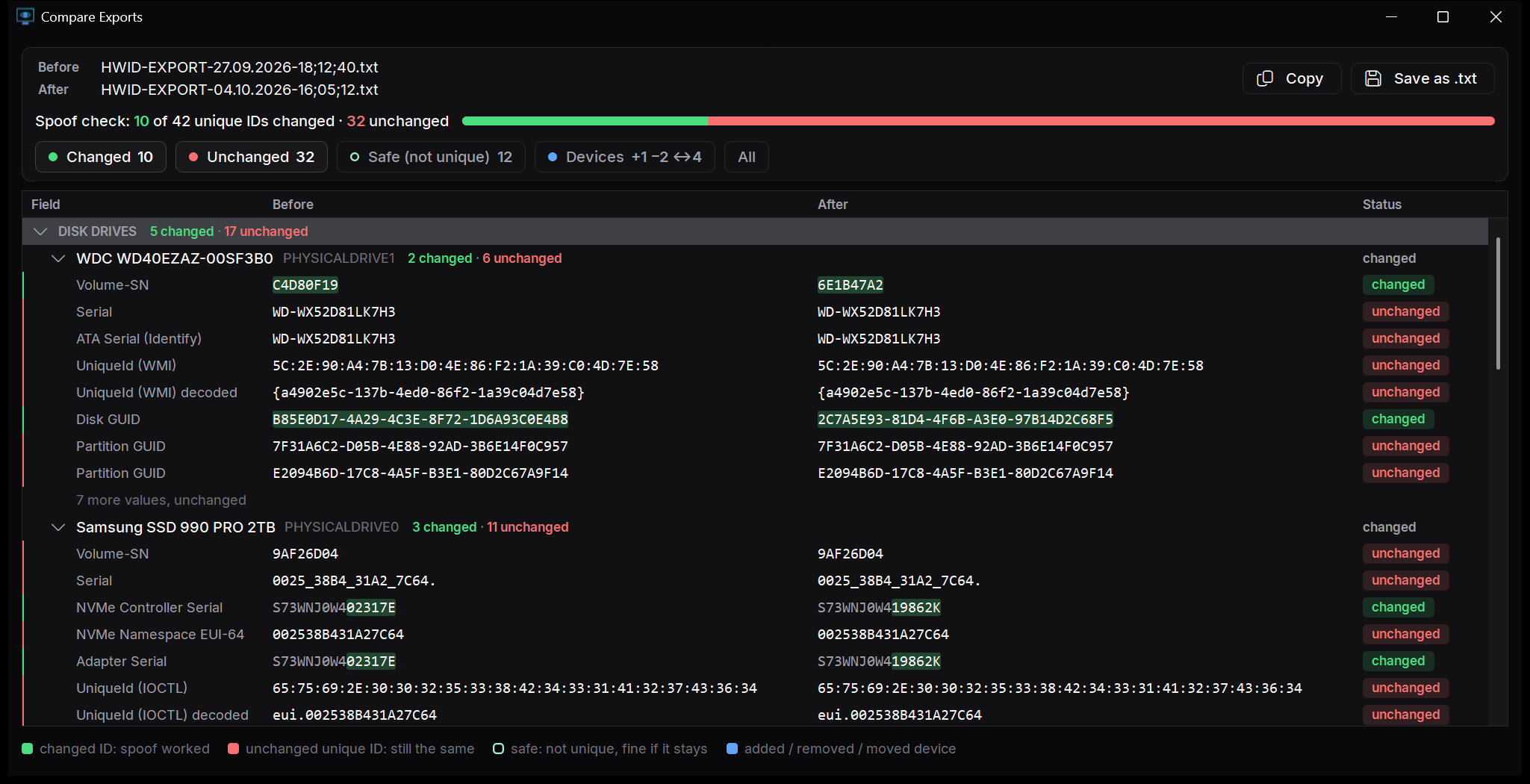
aftercopy. - Select Compare now and pick the
beforeexport to compare it with the current system, or Compare files to compare two exports. Green marks an identifier that changed, red a unique identifier that is still the same, and outlined light green a placeholder value that was never unique. Check that an intended change persisted and that unrelated manufacturer, model, capacity, firmware, or certificate fields did not change unexpectedly.
For firmware-level changes, take three captures: before the change, immediately after the first reboot, and again after a full shutdown and cold boot. A value that returns after a cold boot was not proven persistent.
For storage comparisons, record the connection path (native M.2, direct SATA, USB bridge, or RAID controller) and use the same path for both captures. A transport change can change what Windows is able to query. A
CAUTION
The exports can contain a Windows product key, stable hardware identifiers, TPM certificate data, and network addresses. Keep them private. Redact identifiers before sharing excerpts.
Do not use Clean Devices, Clean Logs, or the updater as part of measurement. Those paths change system state and are not required for a before/after comparison.
Keep changed values plausible
A changed value that no real device could have is its own signal. Real devices report specific formats, placeholders, and relationships between fields. Keep a changed identifier inside them. The rules below come from the project's plausibility research (2026-10-03; local copy in docs/research/).
NOTE
Record the baseline first. Before you change anything, record the current identifiers of every part you plan to touch: the full HWIDChecker export plus the per-part values from the part guide. The original values are your revert target. If a write goes wrong, a service misbehaves, or you sell the part, you can restore the factory state. Without the baseline, the old identity is gone forever. How to capture it: Take before and after snapshots.
| Identifier class | Plausible changed value | Anomaly to avoid | Evidence |
|---|---|---|---|
| SMBIOS | Keep the OEM's field lengths and patterns. Nonzero 16-byte UUID in the correct byte order | All-zero or all-FF UUID, invented marketing string, one serial copied into Type 1, 2, and 3 | UUID sentinel rule A; placeholders on shipping boards C; UUID-version or serial-grammar check: no public evidence found |
| NVMe / SATA disk | Printable ASCII SN (20 bytes) and MN (40 bytes), space-padded. Real model, firmware, and capacity together | NUL bytes, blank or repeated 000000000000 SN, impossible model/capacity pair, duplicate GPT GUIDs, stale GPT CRCs | A; retail-model serial prefix rule: no public evidence found |
| NIC / MAC | Unicast address. Local: (first octet & 0x03) == 0x02. Factory-looking: real assigned OUI, new suffix | Multicast bit set, all-zero or broadcast, unregistered OUI as a factory address | Address bits A; OUI-to-PCI-vendor check: no public evidence found |
| GPU | Keep the driver-produced value. AMD unique_id exists on GFX9 and newer only | Random NVIDIA GPU-... UUID that does not match its PDI and chip ID, invented board serial where N/A is normal | A |
| EDID / monitor | Registered PNP code, valid product code, optional serial, valid date, checksums correct | Unregistered PNP code, week outside 0, 1..54, 0xFF, future year, bad checksum | Rules A; zero serial common in a real-device corpus C |
| RAM / SPD | Unique four-byte serial. Manufacturer, part number, date, and location kept together | Serial unrelated to vendor or part, changed CRC-covered bytes without a CRC update | A; 00000000 on real modules C |
| USB | iSerialNumber=0, or a printable serial unique per VID/PID/revision | Control characters or comma, one fake serial shared across units, MI_00 or MSFT100 treated as a serial | A; zero-filled strings on real devices C |
| TPM | Real EK public key. Certificate can be missing on some fTPMs until fetched online | Empty EK public key on a ready TPM, EK key and certificate mismatch, fabricated chain | A; Intel 11th Gen On-Die CA transition C |
| Windows state | Unique, nonzero canonical GUID, for example MachineGuid | Empty, zero, malformed, or cloned GUID; only MachineGuid changed while hardware stays the same | Microsoft-documented consumers A; MachineGuid validation contract: no public evidence found |
Null values that are normal on real hardware:
- A RAM serial of
00000000. Real Corsair and SK hynix-family modules report it through SMBIOS and CPU-Z. It is a real-world exception, not the JEDEC ideal. C - USB
iSerialNumber=0. It means "this device has no serial" and is normal for hubs, HID devices, and low-cost peripherals. A - An EDID numeric serial of zero. EDID allows it, and internal laptop panels often have no serial at all. A C
To Be Filled By O.E.M.,Default string, or a blank SMBIOS serial. These ship on real DIY and white-box boards. C
Null values that are never normal:
- An empty EK public key on a Windows-ready TPM. It points to failed or incomplete provisioning, not privacy. A
- An all-zero or all-
FFSMBIOS UUID on a fully provisioned PC. DMTF conformance forbids both. A - NUL bytes in an NVMe SN or MN. NVMe ASCII allows only bytes
0x20to0x7E. A
Per-tool traps
| Tool | Anomaly it can create | Rule |
|---|---|---|
| AMI DMIEdit / AMIDEWIN | Arbitrary text, same value in unrelated structures, sentinel UUID | Change only the device-specific suffix. Keep each field's format. Keep the UUID nonzero |
| SSD MP tools | Blank or all-zero native serial, invented model on a real controller | Keep the real model, firmware, and capacity family. Use a printable 20-byte SN |
| EDID editors | Unregistered PNP code, only one of two serials changed, stale checksum | Change numeric and text serials together. Recheck every 128-byte checksum |
| pg27aqdp-serial (ASUS PG27AQDP) | A serial outside the factory format (S8LMRS followed by six digits) typed in Edit full serial (risk mode) | Enter only the last four characters and let the tool keep the S8LMRS01 prefix |
| SPD programmers | All-zero or reused serial, trusting the CRC as proof | Use a unique four-byte serial. The CRC does not cover or validate the serial |
| rtl8159-flasher (RTL8159 USB NIC) | Changed maker part in the Advanced tab, so the OUI no longer matches the adapter | Use the Safe tab: keep the first three bytes and change only the last three |
Windows NetworkAddress | Multicast first octet, fake universal OUI, duplicate MAC | Use local-unicast bits, or keep the original OUI and change only the suffix |
Sampling a field is not proof that a validator checks its format. The public EAC reversing artifacts show which fields are collected, not that a format is rejected. They are community reversing artifacts S. A claim that an anti-cheat checks a model prefix, UUID version, or NIC OUI match has no public evidence found. (Section 10 of the plausibility research, local copy in docs/research/.)
Clean Windows reinstall checklist
A clean install removes personal files, apps, settings, and manufacturer customizations. Microsoft calls it an advanced option. A Microsoft clean-install instructions
Before booting the installer
- Verify a separate backup by opening representative files from it.
- Save recovery keys for every encrypted internal and external volume. Microsoft documents how to locate a backed-up BitLocker recovery key. A Find your BitLocker recovery key
- Record the installed Windows edition. Reinstall the matching edition so activation can be recovered through supported licensing.
- Create current installation media from Microsoft, not a third-party ISO mirror.
- Download the exact chipset, storage, network, and graphics drivers from the PC or component vendor.
- Finish and verify approved firmware/device changes before the reinstall.
- Disconnect backup drives and every drive that is not meant to be erased. Leave only the installer and the internal disks that are explicitly in wipe scope.
During setup
- Boot the official installation media using the PC manufacturer's documented boot menu.
- Choose the clean-install path and confirm that files, apps, and settings will be deleted.
- At the disk-selection screen, follow Microsoft's clean-install procedure: delete the partitions on Disk 0 until only Disk 0 Unallocated Space remains, then select it. Microsoft explicitly warns not to modify other listed disks. Disconnect non-target disks before setup if the numbering could be ambiguous. A
- Treat partition deletion as a logical clean install, not certified data sanitization. Microsoft's
diskpart clean allwrites zeros to every sector, but it is a different, destructive operation and is not required merely to reinstall Windows. A Microsoftcleancommand - Follow the supported account and network flow shown by the installer. Current Windows 11 requirements say that Home and Pro for personal use need internet connectivity and a Microsoft account during initial setup. Do not use undocumented bypass scripts. A Microsoft Windows 11 requirements
- Do not restore a previous PC backup during setup. Microsoft states that signing in with the same account can restore app pins, settings, files, and Wi-Fi information. A
NOTE
Setup screens can change by edition and build. Follow the current Microsoft flow, decline restoration of an old PC, and take the clean baseline before adding other accounts or devices.
After the first desktop
- Install only official device drivers required for the baseline.
- Apply Windows security updates, then reboot.
- Run HWIDChecker and save the clean after snapshot before restoring personal accounts, Windows Backup, cloud sync, or old peripherals.
- Reconnect one device at a time. Rescan after each connection when you need to attribute a new serial or PnP instance.
- Re-enable security features that were temporarily changed, when the exact hardware guide and recovery state say it is safe. Confirm BitLocker protection is in the intended state.
Known-spoofable hardware
This table lists one row per part guide. It does not recommend a seller or promise that every retail device with the same name contains the same controller.
WARNING
Entries marked S are research leads, not verified procedures. Do not buy hardware or run a write tool from this table alone. Open the linked guide, verify the exact controller, board revision, firmware, NAND or EEPROM, backup path, and recovery method first.
| Part | What can be changed or substituted | Evidence | Guide |
|---|---|---|---|
| Motherboard | Type 1 system, Type 2 baseboard, and Type 3 chassis fields on an AMI Aptio platform with firmware that permits SMBIOS writes | Field definitions A; exact write support and switches S | Motherboard: what changes |
| NVRAM / EFI variables | No generic change is supported. Use read-only inventory unless the vendor publishes an exact procedure | Read-only inspection A; unknown writes S | NVRAM: why writes are excluded |
| Storage | Controller-reported model, serial, and firmware on supported controllers: Maxio MAP1202, Silicon Motion SM2263XT (serial and, where the exact firmware supports it, namespace EUI-related fields), and the YANSEN / KingSpec 2.5-inch workflow (model, serial, firmware, optional WWN). A Realtek RTL9210B USB enclosure can change USB/SCSI bridge strings and the bridge serial; that does not rewrite the SSD's native NVMe identity | MAP1202 and YANSEN / KingSpec: project-owner tests C, not independently repeated. SM2263XT: controller characteristics A, write workflow S. USB bridge: layer distinction A, bridge behavior CC, write workflow S | SSD: M.2 workflow, SM2263XT notes, USB bridge identity, SSD: 2.5-inch workflow |
| NIC / MAC | Recommended: stored MAC and USB serial on a Realtek RTL8159 USB 10GbE adapter (tested: Lekuo DR59R11) with this project's rtl8159-flasher. Also: current software MAC override through NDIS NetworkAddress (the permanent MAC remains separate); firmware base MAC on the Mellanox ConnectX-3 CX311A / MCX311A-XCAT; controller EEPROM, NVM, OTP, or eFuse MAC where the dedicated guide matches an exact supported Intel, Realtek, or ASIX controller | RTL8159 project hardware test C; override model A; ConnectX-3 named hardware test C; storage models A; individual procedures range from C to S | MAC: RTL8159 (recommended), MAC: Windows override, MAC: ConnectX-3 workflow, MAC: controller storage |
| RAM | Module SPD identity fields on a supported DDR4 EE1004 EEPROM or DDR5 SPD5118 hub with a compatible external programmer, subject to hardware and software write protection | Field layout and protection model A; write workflow S | RAM: external-programmer procedure |
| Monitor | EDID manufacturer, model, product code, and serial presented downstream, through a programmable EDID emulator or a display with a documented writable EDID. On the ASUS PG27AQDP with MCM107 firmware only, this project's pg27aqdp-serial tool changes the serial stored in the monitor, on HDMI and DisplayPort | Observable fields A; write procedure device-specific; PG27AQDP tool verified by this project on the studied unit C | Monitor: change methods, Monitor: PG27AQDP firmware tool |
| TPM | dTPM: replacing a board-compatible discrete module substitutes another TPM and its endorsement identity. This is hardware replacement, not a software spoof. fTPM: a standard clear changes state, not the EPS; some firmware-specific identity-change reports exist, with mixed evidence | dTPM identity model A, compatibility board-specific; fTPM clear semantics A, platform results range from C and CC to S | TPM: implementation types, fTPM reset evidence |
| Router or gateway | A routed isolation router under your control, including supported OpenWrt hardware, substitutes the first-hop gateway and LAN-side MAC visible in the PC's neighbor table | Routed design A; exact menu is device-specific | ARP: what changes |
AMI publishes Aptio firmware utilities, but public availability of a utility does not prove that an end-user board permits a particular write. A AMI Aptio Utilities
Reported anti-cheat status
This table separates what each vendor states from what the community reports. Every cell carries its own grade. Requirements are current as of 2026-10-03.
| Anti-cheat / game | Official hardware-ban statement | Current requirements (2026-10) | Vendor-disclosed identifier classes | Community-reported candidates | Spoofer-tool detection |
|---|---|---|---|---|---|
| EAC / Fortnite | Yes. Epic names hardware bans A | Game-dependent | Device identifiers and hardware/software specifications, no field list A | Rust/EOS sample: MAC, MBR disk signature, partition number, disk LUN, community reversing artifact S (artifact). Broader disk, SMBIOS, GPU, EDID, MachineGuid, NVRAM list S | Yes. Epic warns about tools that hide or change identifiers A |
| EAC / Rust | No Rust vendor field formula. A 2026 ban on a freshly reinstalled used PC is reported S | TPM 2.0 + Secure Boot on Secure servers, expanding in October 2026, not global yet A | Same Epic categories A | Same Rust/EOS sample C. RAID 0 physical-serial claim: no confirmation found | Yes, at the EAC tool level A |
| BattlEye | Game- or publisher-specific, not universal A | No product-wide requirement found | Hardware identifiers including serial numbers, IP and account, processes, drivers, executable code A | CPUID, SMBIOS, disk, MAC, GPU lists S | Yes. Collects processes, drivers, and executable code A |
| Vanguard / VALORANT | Yes. VAN 152 is a hardware-ID ban A | May require TPM 2.0, Secure Boot, IOMMU, VBS/HVCI by configuration. Pre-Check baseline: Windows 11 25H2 + TPM 2.0 + Secure Boot + IOMMU + VBS + HVCI A | Unique device IDs, manufacturer, model, specifications A | Disk, SMBIOS, TPM, MachineGuid, GPT, EDID, UEFI S | Yes. Validates memory and system state A |
| FACEIT / CS2 | Hardware/device IDs used for ban-evasion and multi-account review A | TPM 2.0 for all players since 2025-11-25, with Secure Boot. IOMMU/VBS for about 60% of players and all above 3,000 Elo, still expanding A | Device-identifying information, processes, boot-chain and memory integrity A | No artifact-backed field list found | Yes. Bans cheat loaders, drivers, bypass attempts, and VMs A |
| RICOCHET / Black Ops 7, Warzone | Yes. Cross-title hardware bans A | TPM 2.0 + Secure Boot + Microsoft Azure Attestation. Failed checks reduce playlists A | Hardware/software information and identifying device/process information, no field list A | Motherboard, CPU, GPU, disk, MAC, TPM claims S | Yes. The September 2026 post targets spoofers and evasion tools A |
| ACE / Delta Force | Yes. Hardware bans are an opt-in option for game developers A | Delta Force: TPM 2.0 + Secure Boot A | MAC and NIC metadata, disk serial/model/firmware/GUID, MBR/GPT hash, display, OS, RAM, CPU, system hashes. The game developer picks the optional fields A | The vendor list is already more precise. Per-title use varies | Yes. Driver signatures, suspicious DLL/SYS paths, processes, registry, file traces A |
| EA Javelin / Battlefield 6 | No device-ban statement found. EA reports account bans | Secure Boot required. Strict TPM 2.0 since 2026-08-31 A | Hardware identifiers, machine-component fingerprint/hash, peripheral hardware A | No artifact-backed field list found | Yes. Prohibited software/hardware, vulnerable drivers, spoofed compliance A |
| VAC | No vendor hardware-ban statement. Enforcement is account-oriented A | No requirement in VAC docs | Valve platform device IDs, not a VAC ban formula A | Community claims conflict S | Detects identifiable cheats. Valve says hardware configuration does not trigger a VAC ban A |
Grades in this table: A is a statement in a cited vendor document, C is community evidence with an inspectable artifact, S is a claim without such an artifact. "No confirmation found" means no reliable public source supports the claim.
Reported identifiers are observations or claims, not a guaranteed checklist. Anti-cheat vendors can change fields and weights without notice. C means a versioned trace, binary, log, screenshot, or controlled result was inspectable. Field lists without those artifacts stay S. Permanent hardware and firmware changes leave no resident spoofing hook, but no vendor promises that a changed machine state will be accepted or unlinkable.
The requirements column lists platform settings, not spoofing steps. dTPM is a discrete TPM module: a separate chip with its own endorsement identity, unlike a firmware TPM. Secure Boot is the UEFI feature that allows only signed boot loaders; the reported setups run with it on. IOMMU (Intel VT-d, AMD-Vi) is the processor feature that controls how devices access memory; the reported setups run with it on too. See TPM implementation types for the dTPM-versus-fTPM difference. S
Older info (outdated)
These statuses are community-reported. This project has not verified them. Every row is S. The date is the date of the last reported issue, not a re-test.
| Game(s) | Anti-cheat | Reported status | Last reported issue | Reported requirements |
|---|---|---|---|---|
| Rust | EasyAntiCheat | Undetected | 2026-08-16 (RAID 0, NVRAM) | dTPM, Secure Boot, IOMMU |
| Fortnite | EasyAntiCheat | Undetected | 2026-08-16 (RAID 0, NVRAM) | dTPM, Secure Boot, IOMMU |
| Any | BattlEye | Undetected | none listed | none listed |
| Any | EA Javelin | Undetected | none listed | dTPM, Secure Boot |
| Any | Tencent ACE | Undetected | none listed | dTPM, Secure Boot, IOMMU |
Sources
Sources (38)
- DMTF SMBIOS Specification 3.10.0
- Trusted Computing Group EK Credential Profile 2.7
- Trusted Computing Group TPM 2.0 Library Part 1, Architecture, version 185
- Microsoft: Hardware IDs and Device Instance IDs
- Microsoft: Win32_BaseBoard, Win32_PhysicalMemory, WmiMonitorID, and Win32_Tpm
- Microsoft: NdisReadNetworkAddress and GetVolumeInformationW
- Microsoft: Reinstall Windows with installation media
- Microsoft: Windows 11 specifications and setup requirements
- Microsoft: Windows Backup
- Microsoft: BitLocker recovery overview
- Microsoft: suspend BitLocker for non-Microsoft firmware updates
- Microsoft Q&A: choosing a machine identifier (supporting context, not a Windows product specification)
- AMI Aptio Utilities
- HWIDChecker hardware providers
- Riot: error VAN 152
- Riot: Vanguard security requirements
- Riot: Vanguard Pre-Check
- FACEIT: Windows Security Requirements FAQ
- FACEIT: Known issues with Anti-Cheat requirements
- Call of Duty: RICOCHET, taking on the cheating ecosystem (September 2026)
- Activision: Call of Duty security and enforcement policy
- ACE: PC privacy protocol (PDF)
- EA: Battlefield 6 Season 4 anti-cheat update
- Facepunch: Rust March 2026 update and October 2026 update
- BattlEye privacy policy
- Epic Games: hardware identifiers help page
- Steam Support: Valve Anti-Cheat (VAC)
- EAC/EOS driver analysis evidence (community artifact)
- adrianyy/EACReversing hwid.c (community artifact)
- HWID-Privacy: plausibility rules for changed identifiers (research report)
- DMTF SMBIOS Specification 3.8.0
- NVM Express Base Specification 2.0c
- IEEE: Guidelines for EUI, OUI, and local-address bits
- NVIDIA open GPU kernel modules: GPU UUID derivation and Linux AMDGPU unique_id
- UEFI PNP ID registry and linuxhw/EDID real-device corpus
- JEDEC DDR4 SPD Annex L
- Microsoft: USB serial number rules
- Microsoft: Get-TpmEndorsementKeyInfo and Windows Autopilot TPM requirements